FixedRetry Google sign-in or choose an email code with clearer guidance, and keep using a valid code while waiting to resend.More details
The sign-in screen distinguishes a cancelled or failed Google attempt from an email-code problem. If a resend is temporarily limited, you can still submit the valid code you already received. A successful resend clears the old digits so you can enter the new code.
ImprovedStay signed in during active use with renewed sessions, while temporary connection failures preserve your session for retry.More details
Successful session validation renews a 90-day inactivity window instead of keeping the former 12-hour browser deadline. Concurrent refreshes from multiple tabs are coordinated, and temporary service failures remain retryable. Expired or revoked sessions still require sign-in.
FixedRestart an expired two-factor sign-in from a clear expiry screen; temporary verification failures keep the digits you entered.More details
An expired sign-in attempt now offers a restart action instead of asking you to retry the same authenticator code. A temporary verification failure keeps your digits without marking them as incorrect. A genuinely incorrect code is still rejected, and required two-factor verification still applies.
Settings
ImprovedOpen Settings without another code when your current session has a qualifying verification from the past hour.More details
Settings can reuse your current session’s recent email or Google verification; accounts with two-factor authentication need a recent authenticator verification. The window ends one hour after that verification and does not restart when you open Settings. Older verification or an explicit lock still requires another check, and your existing permissions continue to apply.
ImprovedStart your new account with four guided steps for your profile, workspace, modules and choice of a demo or clean start.More details
New accounts now enter setup before creating a workspace. Choose Compliance, Risk or Everything as a starting point, then adjust individual modules while previewing your navigation. You can change modules later in Settings › Framing.
FixedFinish a module setup that stopped partway without creating another workspace.More details
If your workspace was created but its modules were not fully applied, Finish setup retries those choices on the same workspace. You can also open it with the unfinished modules still off. If the setup window has expired, the flow directs you to Settings › Framing.
Settings
FixedComplete seat checkout with an existing billing profile when tax ID collection requires an updated business name or address.More details
Checkout can now save the business name and address it collects to your existing billing profile. This fixes the checkout rejection caused by tax ID collection when those updates were not allowed.
NewFind active risk demands without an owner in a sortable dashboard queue.More details
The dashboard lists submitted, active demands that have no owner, with their requester and due date. Sort the list and open a demand to review it. The queue is available to the configured analyst role and Account Managers who have permission to read risks.
Integrations
NewSet approved email domains and public-page exceptions for Notion checks, then trace each result to its saved policy.More details
Open your Notion connection’s Settings to save a versioned policy, including a reason for each public-page exception. Check results link to the policy and rule versions used for that run. When Notion does not expose the required information, the result is marked as not observable rather than passed.
API & MCP
NewInspect integration checks, their history and synchronization failures through the API and connected AI tools.More details
Read current check results separately from historical evaluations, and inspect synchronization runs to understand reported failures. Operational reads require Integrations Read permission in the connected workspace. The provider and check catalogs describe available definitions; listing a provider does not activate it.
ImprovedAttach files from a ChatGPT conversation directly to a CSFaaS record as evidence through MCP.More details
Ask the connected assistant to attach a conversation file to the relevant record. Supported files include PDF, PNG, JPEG, GIF, WebP, CSV, DOCX and XLSX, up to 10 MiB. Your existing workspace permissions still apply.
NewAssign work to someone, link it to a framework or policy, and track it in your task list.More details
Link a task to the exact framework or policy version you are working on. Choose an assignee, due date and priority, then use the central task list and its filters to follow the work.
Your workspace
NewShare selected policies, controls and documents through a Trust Center with your branding.More details
Choose the content you want visitors to see. You can make it public or reserve access for approved visitors, while presenting it in a Trust Center with your branding.
Risks
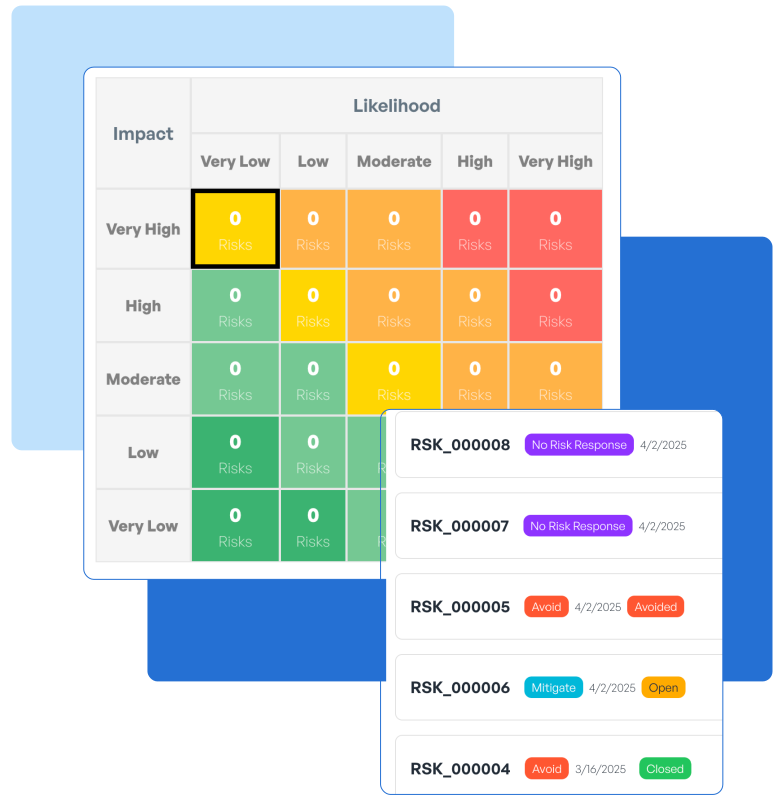
NewKeep a record of each residual risk review, including the evidence and reasons behind the decision.More details
Save the assessment, rationale and decision together when you review residual risk. Return to that review later to understand what was assessed and why the decision was made.
Policies
ImprovedAsk for approval before reopening an approved policy for editing.More details
Request to return the policy to Draft. It stays read-only while approval is pending and returns to Draft when the required approvers accept.
Collaboration
NewDiscuss why a piece of evidence supports a record, right beside that record.More details
Each evidence item has its own discussion thread for its justification. Keep questions and explanations attached to the evidence they concern so the conversation stays in context.
Settings
ImprovedSee when your verified Settings access expires and renew it before it runs out.More details
Settings shows how much time remains in your verified session. Renew that access before it expires when you need to keep working in Settings.
ImprovedKeep using CSFaaS at the same web address, now hosted on Google Cloud.More details
The web app is now hosted on Google Cloud. Keep opening it at app.csfaas.com, including from your existing bookmark.
Collaboration
ImprovedCollaborative editing and synchronization now run on Google Cloud alongside the app.More details
The services behind working together in the app and keeping its data synchronized have moved too. They now run on Google Cloud as part of the same hosting change.
API & MCP
ImprovedKeep using the same API and MCP reference sites after those services move to Google Cloud.More details
The services for integrations and connected AI tools are now hosted on Google Cloud. Their reference sites remain at api.csfaas.com and mcp.csfaas.com.
NewAssess CyFun documentation and implementation separately, with distinct targets, supporting notes, a four-series radar chart and a filterable workbook-aligned summary.
FixedFixed workbook exports to retain additional assessment information and present export errors together.
Risks
ImprovedSelect a risk-matrix cell to explore the records at that exact risk level.