

Target risk is the desired level of risk your organisation aims to reach once all planned mitigation measures and controls are implemented. It reflects your risk appetite and tolerance and your alignment with strategic goals, compliance requirements and risk management policies. It is assessed in the Target Risk tab of the risk.
1. Target Risk Statement
A concise summary of the desired state of the risk after all planned controls are fully implemented: the acceptable likelihood and impact, serving as a clear benchmark for effectiveness.
Example: "All systems, including legacy platforms, are protected by multi-factor authentication (MFA), reducing the risk of unauthorised access to an acceptable level."
2. Target Risk Strength
The capabilities the target state builds on: the controls and practices that will carry the risk at its desired level.
Example: "A hardened identity platform with enforced MFA and continuous access review underpins the target posture."
3. Target Risk Weakness
The challenges or barriers that might hinder reaching the desired risk level: resource limitations, technical constraints or operational obstacles.
Example: "Resource and budget constraints may delay the full rollout of multi-factor authentication (MFA) across all systems."
4. Target Risk Opportunity
The benefits of achieving the target state: operational efficiency, resilience or strategic advantage.
Example: "Achieving full MFA implementation across all systems will strengthen compliance with regulatory requirements and enhance customer confidence."
5. Summary
| Field | Focus | Purpose |
|---|---|---|
| Target Risk Statement | The desired risk state after mitigation | Define the acceptable risk level |
| Target Risk Strength | Capabilities the target relies on | Ground the target in real controls |
| Target Risk Weakness | Barriers to reaching the target | Highlight implementation risks |
| Target Risk Opportunity | Gains from achieving the target | Strategic and operational advantages |
6. Impact Type
Select the relevant Impact Type(s) from your predefined catalogue: financial loss, operational disruption, legal implications, reputational damage, data breach and any other dimension your workspace defines. Categorising the impact clarifies the potential consequences, helps prioritise responses, and aligns the assessment with your organisation's strategic objectives and risk appetite.
7. Risk matrix
After defining the Impact Type, determine the Target Risk level using the risk matrix.
1. Likelihood Level
Begin by defining the likelihood of the risk materialising.
Note: Likelihood = Threat x Vulnerability. Select the threat level and the vulnerability level; the matrix derives the likelihood score.
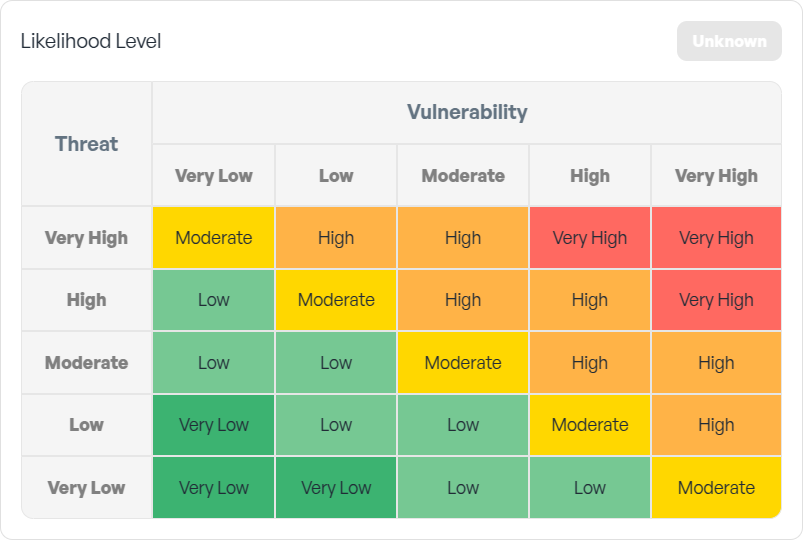
2. Risk Exposure
Note: Risk = Likelihood x Impact. Select the impact; the risk level is placed automatically on the matrix.
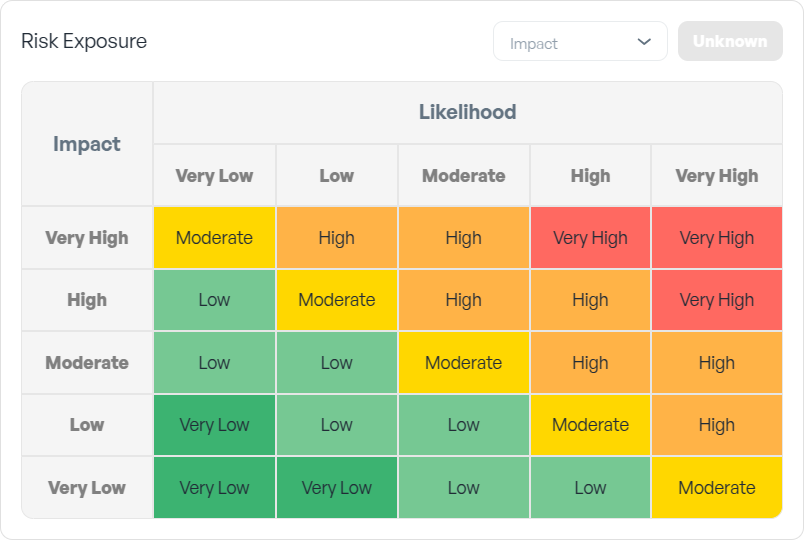
The likelihood and risk exposure model is taken from NIST 800-161r1, section D.4.1.7 "Risk Response Analysis", page 227, extended from 4 to 5 levels. Your workspace's matrix dimensions are configurable in Settings, Risk Matrix.