

Open a system from the register and work through its visible sections. Framing determines which fields are offered, and workspace catalogues supply many of their choices.
Context and architecture
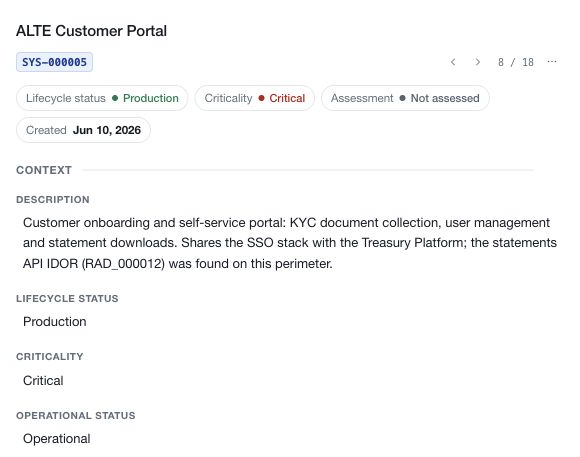
Record the system's name and purpose. In Context, describe where and how it is used through lifecycle, criticality, operational status, internet exposure, countries, business units, environment stages, regions and functional domains where available.
In Architecture, select the applicable system types, domains, architectural domains, accessibility, management, hosting and cloud classifications. Explain significant shared responsibilities or boundaries in Complementary information instead of forcing them into a misleading catalogue choice.
Data held
List the information types processed by the system and assess confidentiality, integrity and availability for each. The CIA summary uses the highest classification in each information-type column when those classifications are recorded. Review the information-type rows as well as any existing summary values.
Set Data classification, Processes personal data and Processes health data where applicable. These fields describe the record; they do not establish the legal basis, safeguards or complete obligations for processing that information.
Recovery
Record the approved Recovery time objective and Recovery point objective. RTO concerns the restoration target; RPO concerns the acceptable recovery point for data. Keep the selected values consistent with the business requirements and recovery arrangements being assessed.
Use supporting evidence to explain how those objectives are tested. Selecting a target does not demonstrate that the system can achieve it.
Contacts and responsibility
Contacts holds named operational contact information. Manage owners separately selects active workspace members accountable for the system. Keeping those concepts separate helps a reviewer distinguish a contact description from an application assignment.
Use Complementary information for scope, exclusions, interfaces, dependencies and operational considerations that need explanation beyond the structured fields.
Relationships, assessments and supporting records
Link existing third parties through Link third party. The relationship is shared with the third-party record; avoid recording the same dependency only as disconnected prose.
Use Manage assessments to select a completed risk demand by title or RAD code, set its assessment periodicity and next date, then Link assessment. Review current and previous assessments separately. Historical links do not automatically establish a current assessment.
Use the record panel for evidence, comments and record reviews. A record-review schedule and the next risk-assessment date serve different purposes. Stakeholder invitations provide scoped collaboration on this system; they do not assign general module permissions.
Save and verify
For section edits, Done retains the pending draft and the page save bar writes it. Cancel a section editor to restore its opening values, or discard the page draft to drop unsaved record edits. Dedicated record actions save separately and are not undone by discarding that draft.
After saving, inspect the resulting record and resolve any incomplete or unresolved values before using it as assessment evidence.