

Keep system information aligned with the component's current purpose, operating state and dependencies. Open the record from Systems and select the section that needs attention.
Edit a section
- Choose Edit beside the relevant section.
- Change the supported fields.
- Choose Done to retain the changes in the page draft.
- Use the save bar to save the pending record edits.
- Verify the refreshed values and resolve any save error.
Done closes the section editor; it does not write the pending page draft. Cancel, Escape and closing the editor restore that section to its opening draft values. Discard changes removes the page's unsaved edits. Leaving with pending changes invokes the page's confirmation flow.
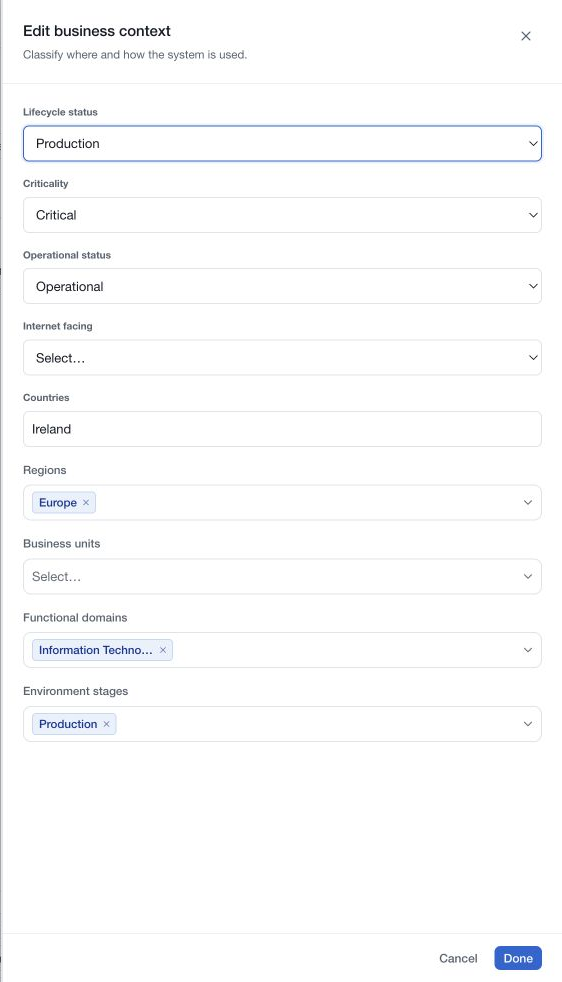
Maintain lifecycle and review information
Lifecycle status is part of the current Context editor. Use the available lifecycle choices consistently with your inventory method. Do not confuse lifecycle with operational status or business criticality.
A decommissioned record is frozen for classification editing. Where authorised, Return to service is a separate action that restores service status. Review its result before making further edits.
Use Reviews in the record panel to maintain the record-review schedule and validate a completed review. Assessments have their own links and next-assessment dates under Manage assessments. Update each when the corresponding work has actually been performed.
Comments, evidence, owner assignments, relationships and assessment actions save through their own controls. Discarding a classification draft does not reverse those completed actions.
Delete only after reviewing the record
Use the selected record's More menu and Delete when removal is appropriate and your permissions allow it. Check the system name and the confirmation's scope before confirming. The action cannot be undone through the editor.
Review dependencies and retention needs before deletion. Removing a relationship is different from deleting either linked business record. Decommissioning can retain an inventory record when the component has left service and its history remains useful.
Do not use a presence indicator as proof of exclusive edit control. Review current data and save feedback when several people work on the same system.