

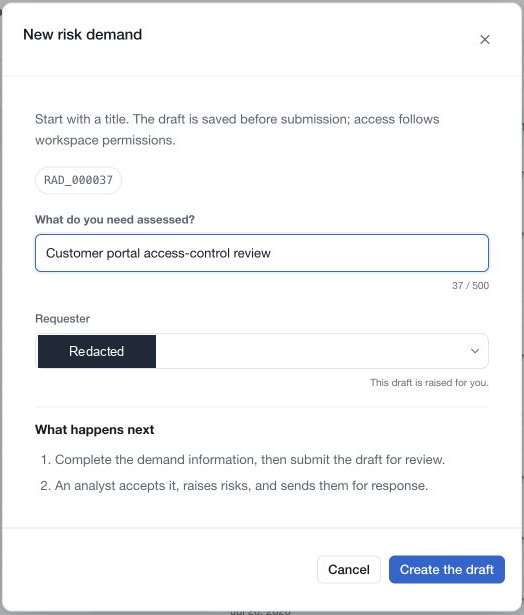
Open Demands under Risk and choose New risk demand. Describe the request in What do you need assessed?, check the requester and choose Create the draft.
The creation form accepts a title of up to 500 characters. Keep it specific enough to distinguish this assessment from other requests, such as “Assess the new customer file-transfer service”. The draft is saved at creation; submission happens later.
Complete the information
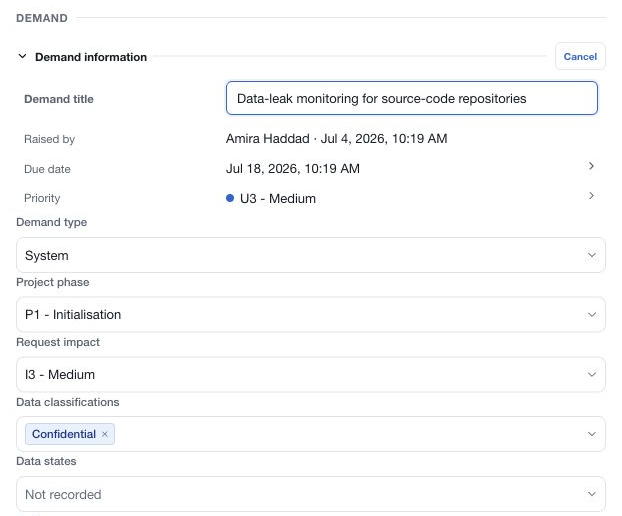
Open Demand information → Edit to review the title, type, project phase, request impact, geography, business units, functional domains, data classifications and states. Record whether PII or PHI is involved.
Use the priority and due-date controls to schedule the assessment. Workspace SLA defaults can help set an initial deadline, but inspect the actual date on the demand.
Explain the request in Description, then complete the context, related policies, business goals, systems and third parties. Save page-level drafts through the save bar. If a collaborative editor reports that it is unavailable, wait for it to reconnect before attempting text changes.
Submit the draft
Choose View status → Submit for review, read the confirmation and submit. The demand moves to Awaiting acceptance, and the submission audience is notified. A draft cannot receive risks or be completed before it enters the assessment workflow.
Quiet drafting means submission notifications have not been sent. Access still follows workspace permissions, so do not treat Draft as an exclusive private document.