

A demand starts as Draft. Preparing it does not trigger the submission notification. Once ready, submit it for review so the responsible team can triage and assess it.
Follow the current stage
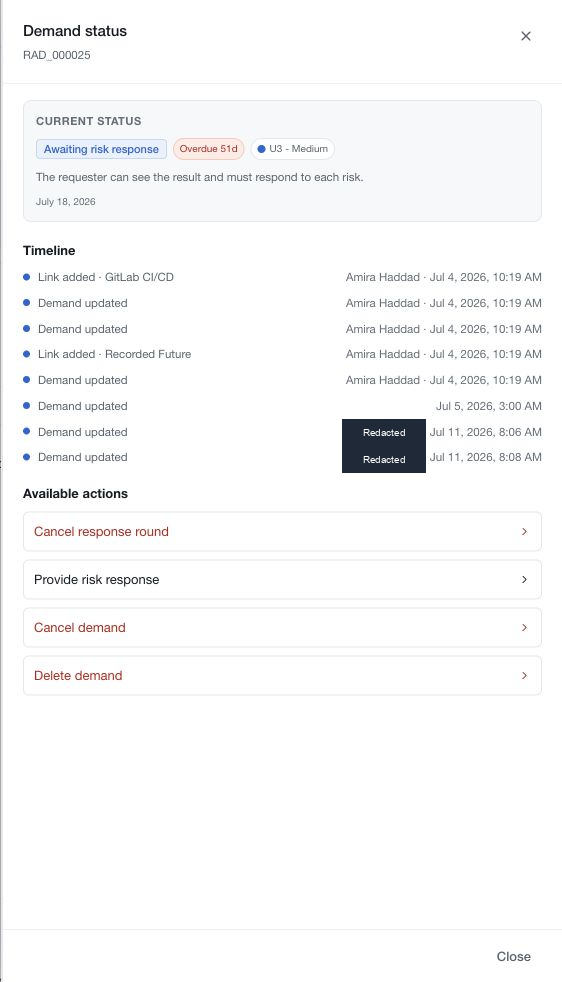
Open the demand and choose View status. The drawer explains the current stage and lists available actions. Changing status requires the appropriate role and confirmation; some actions also require a message.
The drawer includes recent timeline entries. It is a compact view rather than a complete archive of every event. Use the demand's activity resources when investigating further context.
Choose the review process
Direct supports assessment without a mandatory response-approval round. Analyst review introduces formal triage and a handoff for the risk response. Analyst + assurance adds the final assurance gate.
These settings do not grant every member unrestricted access. Permissions, role assignments, requester or stakeholder access and the current stage still apply. A draft's quiet notification state is not a promise that authorised managers cannot view it.
Distinguish ownership from access
The requester raises the need, demand owners hold accountability, analysts conduct the assessment and assurance reviewers perform the configured final review. During an enforced response round, a requester may be allowed to provide the response while the assessment fields remain read-only.