

The System Management Interface
The System management interface includes advanced filtering options for refined searches. Follow these steps to apply specific filters:
1. Open the Search Criteria Drawer
-
Click on the "Search Criteria" button located in the top-right corner.

-
A drawer will appear, providing a variety of filtering options.
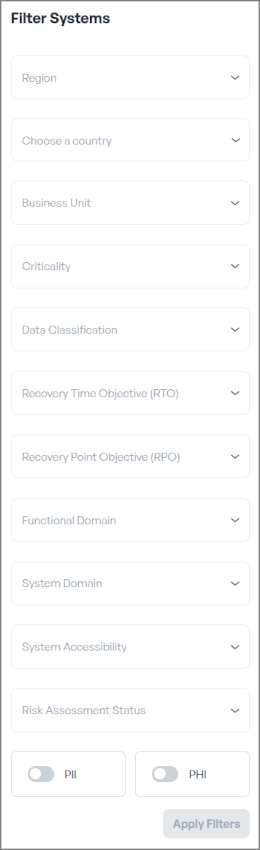
2. Select Your Criteria - Filtering Options
Choose the filtering options that match your needs.
- Filtering Options:
- Region
- Country
- Business Unit
- Criticality
- Data Classification
- Recovery Time Objective (RTO)
- Recovery Point Objective (RPO)
- Functional Domain
- System Domain
- System Accessibility
- Risk Assessment Status
- PII
- PHI
- Remove Criteria: To remove specific criteria, deselect them directly in the drawer or click the "Clear Filter" button at the bottom of the page to reset all selections.
- Apply the Filter: Once your filtering selection is complete, click the blue "Apply Filter" button at the bottom of the drawer. The results matching your selected criteria will then be displayed.