

Control evaluation records different aspects of a measure. Use evidence and a short rationale to explain each assessment rather than relying on a number alone.
Implementation progress
Open the control's completion editor, set a value from 0 to 100 and explain the current state. In the Controls register this editor is labelled Implementation progress; in Policies it is available from Evaluation or the completion indicator.
Completion describes implementation progress. A value of 100% does not independently establish that a control is effective, that all associated requirements are satisfied or that an organisation is certified.
Current and target maturity
Record the current level and the intended target separately. The policy control interface uses levels 0–5: Not defined, Initial, Developing, Defined, Managed and Optimized. Keep the current and target justifications specific to the control.
An unassessed value is different from an explicitly recorded level zero. Assess maturity independently from completion: an implemented measure may still lack consistent measurement or improvement.
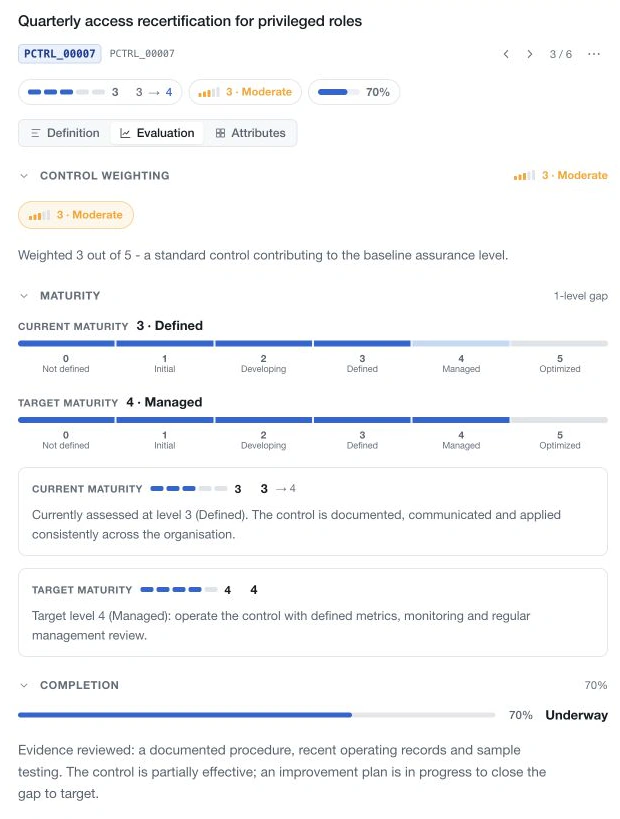
Weighting
Choose the appropriate weight from the workspace's configured scale and explain its significance. The labels and available levels come from the shared weighting configuration in Databases.
Save the evaluation and review its displayed values. Policy statistics aggregate underlying control results, so inspect the included controls and chart scope when interpreting an average or a gap to target.