

The lowest hierarchy level is labelled Requirement in the current interface. These entries correspond to the subcategories described in earlier documentation and provide the detail needed for assessment and policy coverage.
Create and identify a requirement
Select its parent category and choose Add element. Choose the child Requirement level, verify the proposed location and enter the display code, name and description. Choose Add and inspect the new entry.
The editable display code can follow the publisher's numbering. The permanent tracking ID identifies the workspace element even when its displayed wording or position changes.
Record the assessment
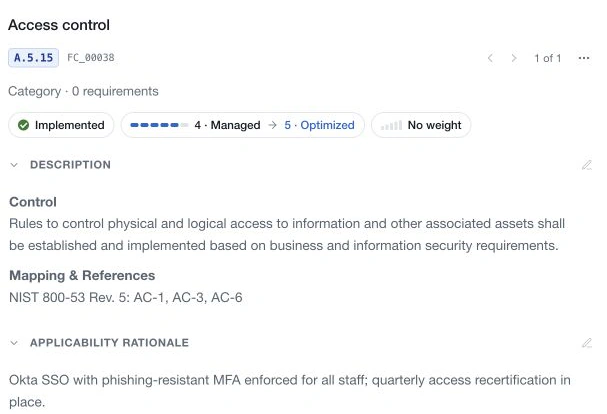
Select applicability and explain the decision. Use Partially implemented when relevant work exists but the requirement is not fully in place. Use Not applicable for a reasoned scope exclusion, rather than to hide unfinished work.
Assess current and target maturity using the displayed scale. Where enabled, document and score implementation and documentation independently. Explain the evidence behind each score and what is needed to reach the target. Leave an assessment unset rather than using zero to mean unknown.
Assign weighting, accountable owners and review information. Supporting evidence and comments help another reviewer understand the judgement. Where an assessor-comment thread is available, its current entry and history serve a different purpose from general record discussion.
Link policy controls
Inspect Control progression and the controls linked from Policies. Check that their wording actually addresses the requirement. Link status tracks the completeness of those relationships; it is separate from applicability, maturity and control effectiveness.
Use the available completion or not-required action only after reviewing the link set. These actions save independently of the requirement draft.
Save and revisit
Choose Save in the editor or Save changes in the page bar. Closing an editor can retain unsaved changes; use Discard to remove them. Resolve pending edits before navigating to the next requirement.
Previous and next controls follow the available structure. A requirement can be moved within the supported hierarchy, or deleted through its options and confirmation when authorised.