

The Frameworks module turns a reference structure into a maintained workspace assessment. It connects requirements, accountable people, supporting information and the policies used to address them.
Build and organise
Choose an edition and language from the Reference library, or use Start blank for a custom framework. Organise the hierarchy into domains, categories and requirements. Each element has a permanent tracking ID and an editable display code.
Use the tree to navigate, search and inspect child requirements. Where your permissions and the version allow it, add elements and reorganise the structure. Save pending changes before switching to another requirement.
Assess and explain
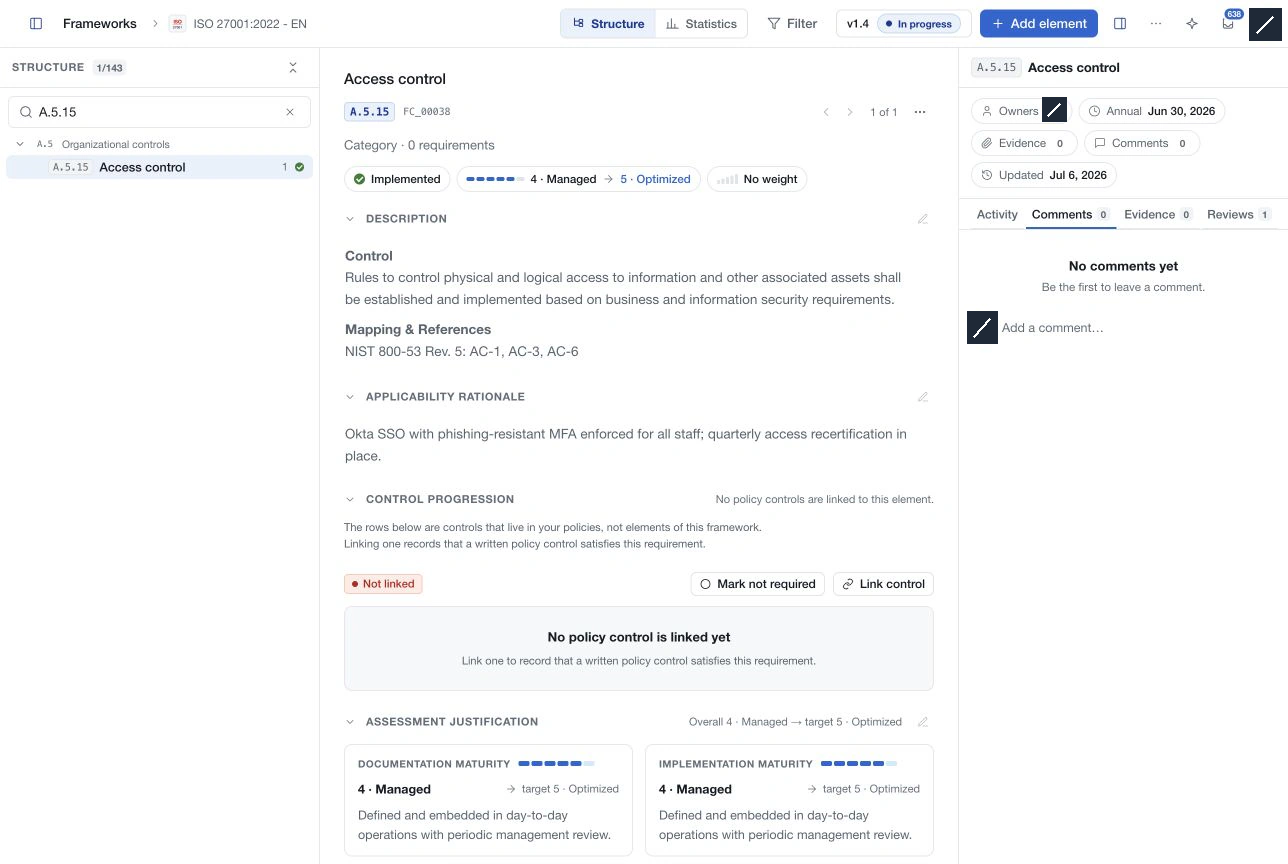
Record applicability as Not assessed, Implemented, Partially implemented, Not implemented or Not applicable. Add the scope and rationale behind the decision.
Assess current and target maturity, using documentation and implementation axes where enabled. Weighting expresses relative importance using the workspace scale. Owners, reviews, comments and evidence help keep the assessment current and reviewable.
Connect and govern
Enable Available in policies when the framework should participate in policy-control linking. Inspect the actual linked controls and the link-completion status separately from implementation or maturity.
Use version history to prepare a new revision, submit it for approval and read previous copies. Pending, approved, historical and deletion-pending states restrict editing according to the workflow. Version and deletion approvals are configured under Settings → Approvals.
Monitor progress
Use Statistics for applicability and maturity charts and coverage details. Read the assessed population alongside averages; missing assessments do not prove low or high maturity. Supported CyFun references have an additional assessment summary with completeness and scheme-specific checks.
Live updates and compatible presence indicators support collaboration. They do not provide an exclusive edit lock or replace save confirmation.