
Skip to content
CSFaaS
Resources
DocumentationAPI referenceMCP
DocumentationDocs
ResourcesDocumentationProduct guides & methodologyAPI referenceEndpoints, models & examplesMCPConnect your AI clientOpen app
Open app
Documentation
Open appAPI referenceMCPContact support

Loading documentation…

Documentation
Documentation
Open appAPI referenceMCPContact support

Search documentation

0 saved guides. Search titles and guide content.

Find a guide by title or search its content. Save useful guides from their page tools to find them here.

↑ ↓ to navigate · Enter to openEsc to close
6. Create your own framework(s) · CSFaaS Docs
Skip to content
CSFaaS
Resources
DocumentationAPI referenceMCP
DocumentationDocs
ResourcesDocumentationProduct guides & methodologyAPI referenceEndpoints, models & examplesMCPConnect your AI clientOpen app
Open app
Documentation
  • 1.Welcome to CSFaaS
  • 2.Discover CSFaaS
  • 3.CyberSecurity Risk Management - Fundamentals & Guidelines
  • 4.Prepare your organisation
  • 5.Workspace settings and configuration
  • 6.Prepare your assets and key components
  • 7.Manage your Supply Chain
  • 8.Manage your frameworks
    • 1.What you can do with Frameworks
    • 2.Decide which frameworks apply
    • 3.Browse available framework references
    • 4.Framework summaries
    • 5.Import a framework reference
    • 6.Create a custom framework
    • 7.Work with the framework register
    • 8.Analyse and filter a framework
    • 9.Manage framework domains
    • 10.Manage framework categories
    • 11.Manage individual framework requirements
    • 12.Version and approve a framework
    • 13.Request deletion of a framework
  • 9.Manage your policies
  • 10.Manage your controls
  • 11.Operational Use of the CSFaaS Risk Management Solution
  • 12.Forms
  • 13.Manage your Evidences
  • 15.Help and support
  • 16.Put the documentation into practice
Open appAPI referenceMCPContact support

Loading documentation…

Documentation
Documentation
  • 1.Welcome to CSFaaS
  • 2.Discover CSFaaS
  • 3.CyberSecurity Risk Management - Fundamentals & Guidelines
  • 4.Prepare your organisation
  • 5.Workspace settings and configuration
  • 6.Prepare your assets and key components
  • 7.Manage your Supply Chain
  • 8.Manage your frameworks
    • 1.What you can do with Frameworks
    • 2.Decide which frameworks apply
    • 3.Browse available framework references
    • 4.Framework summaries
    • 5.Import a framework reference
    • 6.Create a custom framework
    • 7.Work with the framework register
    • 8.Analyse and filter a framework
    • 9.Manage framework domains
    • 10.Manage framework categories
    • 11.Manage individual framework requirements
    • 12.Version and approve a framework
    • 13.Request deletion of a framework
  • 9.Manage your policies
  • 10.Manage your controls
  • 11.Operational Use of the CSFaaS Risk Management Solution
  • 12.Forms
  • 13.Manage your Evidences
  • 15.Help and support
  • 16.Put the documentation into practice
Open appAPI referenceMCPContact support

Search documentation

0 saved guides. Search titles and guide content.

Find a guide by title or search its content. Save useful guides from their page tools to find them here.

↑ ↓ to navigate · Enter to openEsc to close
Documentation8. Manage your frameworks6. Create your own framework(s)
CSFaaS
DocumentationV1 - Archived guide

6. Create your own framework(s)

Updated 2 months ago1 min read
V1V2V3

8. Manage your frameworks

Archived guide · V1View current version

For organisations with unique needs, CSFaaS allows the creation of custom frameworks tailored to specific business practices, risk management strategies, or industry requirements.

This flexibility ensures your security and compliance efforts align closely with organisational goals and can adapt as your environment evolves.

Creating a custom framework#

Creating a custom framework with CSFaaS is quick and easy:

  • Navigate to the Framework section.
  • Click on the blue button “Add a Framework.”

    Add a Framework
  • Select “Start from scratch” from the list of available options.
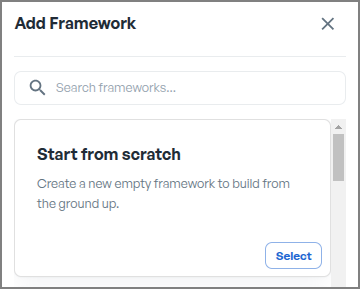
    Framework Add Empty
  • Click “Add to Workspace” – and that’s it!
    A new empty framework has been built from the ground up and is now integrated into your workspace, ready for customization and application.
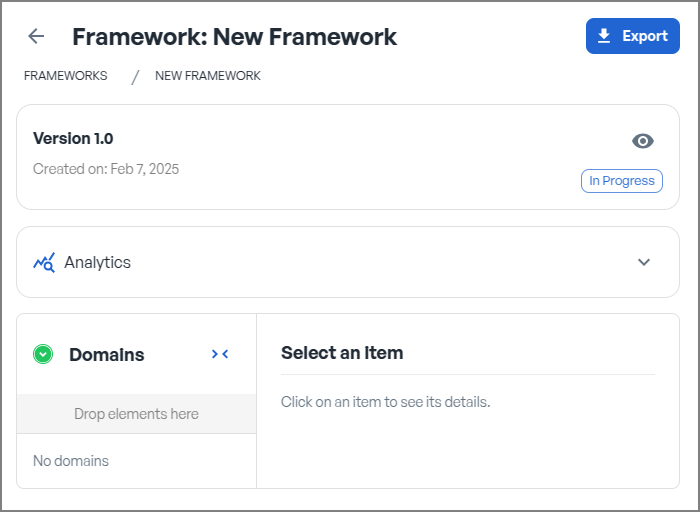
    Framework new
Read this guide onlinehttps://www.csfaas.com/documentation/8-manage-your-frameworks/6-create-your-own-frameworks/?revision=v1
Previous5. Import a framework reference
Next7. Work with the framework register
CSFaaS documentationNeed help?
ON THIS PAGE
OverviewCreating a custom framework
PAGE TOOLSBack to top