

This page explains where catalogue configuration happens today, who is allowed to edit catalogues, and which catalogues are shared across several modules.
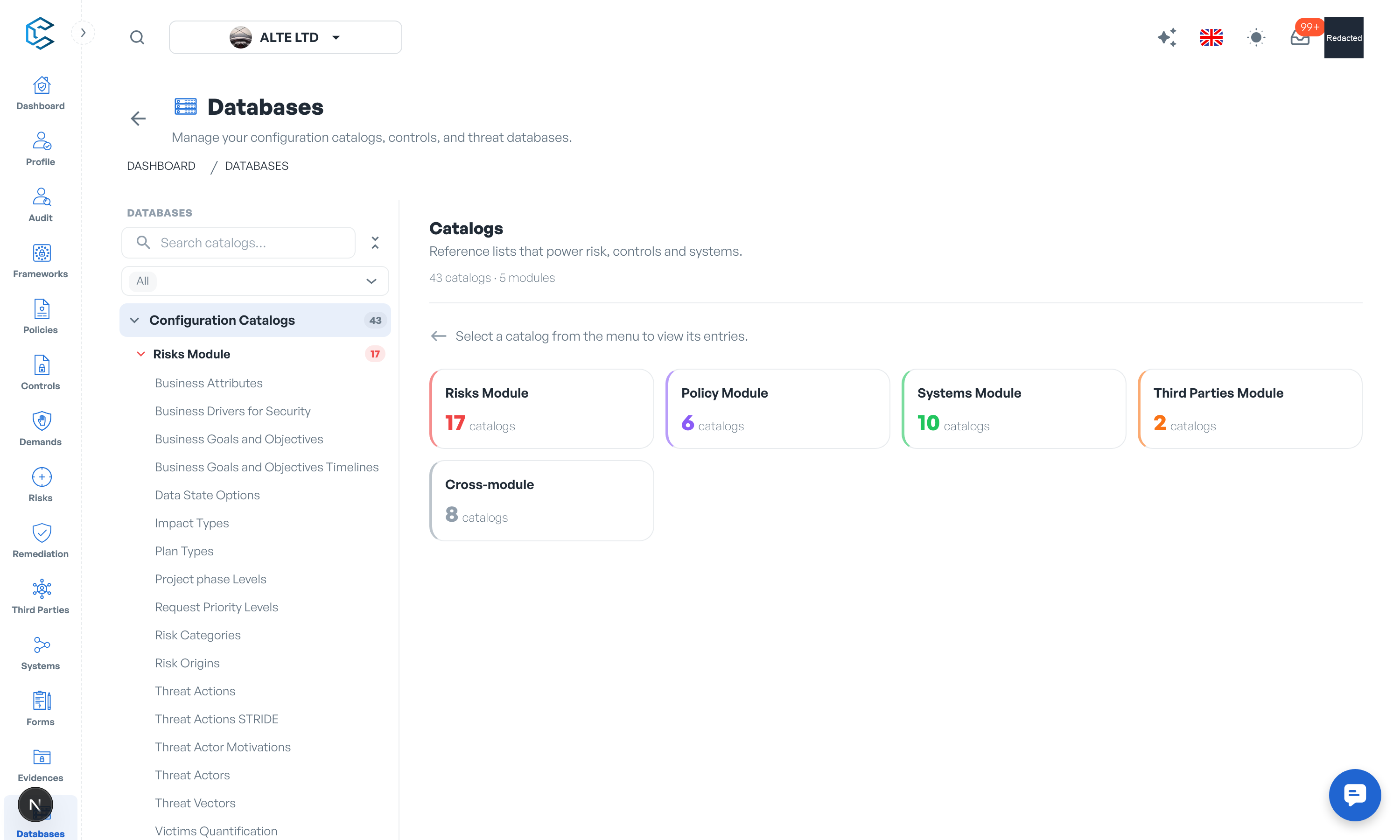
1. Where Catalogue Configuration Lives
Open the Databases module from the left menu and select the Configuration Catalogs tab. The catalogues are presented as a tree, grouped by the module they power:
- Risks Module
- Policy Module
- Systems Module
- Third Parties Module
- Cross-module (catalogues used by several modules at once)
A search field filters the tree, and the overview shows how many catalogues and modules are available. Select a catalogue to see its entries, then click Open editor to modify it (or View entries if you only have read access).
2. Editing a Catalogue
Inside the editor you can:
- Add new entries to extend a catalogue with values specific to your organisation.
- Edit entries to adjust names and descriptions to your vocabulary.
- Hide or unhide entries, so unused values disappear from pickers without being lost.
Warning: deleting a catalogue entry is irreversible. Prefer hiding an entry when you may need it again.
3. Who Can Edit Catalogues
Catalogue editing is governed by the Catalogs permission in the roles matrix (Settings, Roles):
- The workspace owner and Account Manager role holders can always edit catalogues.
- Other members need the Catalogs permission at the matching level (View to consult, Edit to modify).
- Without edit access, catalogues display with a Read-only chip and the editor is unavailable.
Note the separation of duties: the Databases permission governs the Controls Database and the Threat Attacks Database, while the Catalogs permission governs the configuration catalogues described here. There is no workspace-wide switch to lock catalogue editing; access is entirely permission-based.
4. Cross-Module Catalogues
Some catalogues have a global scope and feed several modules at once. Typical examples:
- Architectural Domains: categorises business and IT environments into distinct architectural domains, used by the Risk and Systems modules.
- Business Units: your operational divisions, used across Risk, Policy, Systems and Third Parties.
- Data Classification Options: data sensitivity levels guiding handling and access controls, used by Risk, Systems and Third Parties.
- Functional Domains: key areas of business operations, used across Risk, Policy, Systems and Third Parties.
- Regions: geographic areas for regional analysis, used by Risk, Systems and Third Parties.
Because these catalogues shape entries in several modules, it is worth agreeing their values early, ideally during workspace setup, before your team starts recording risks, systems and third parties against them.
Privacy note. Personal details in this revision have been removed, masked or replaced for privacy. The original is retained privately.