

Tags are lightweight, colour-coded labels for organising work your own way, on top of the structured catalogues. The Tags section of Workspace Settings is the central place to manage every tag used across your workspace.
1. Managing Tags
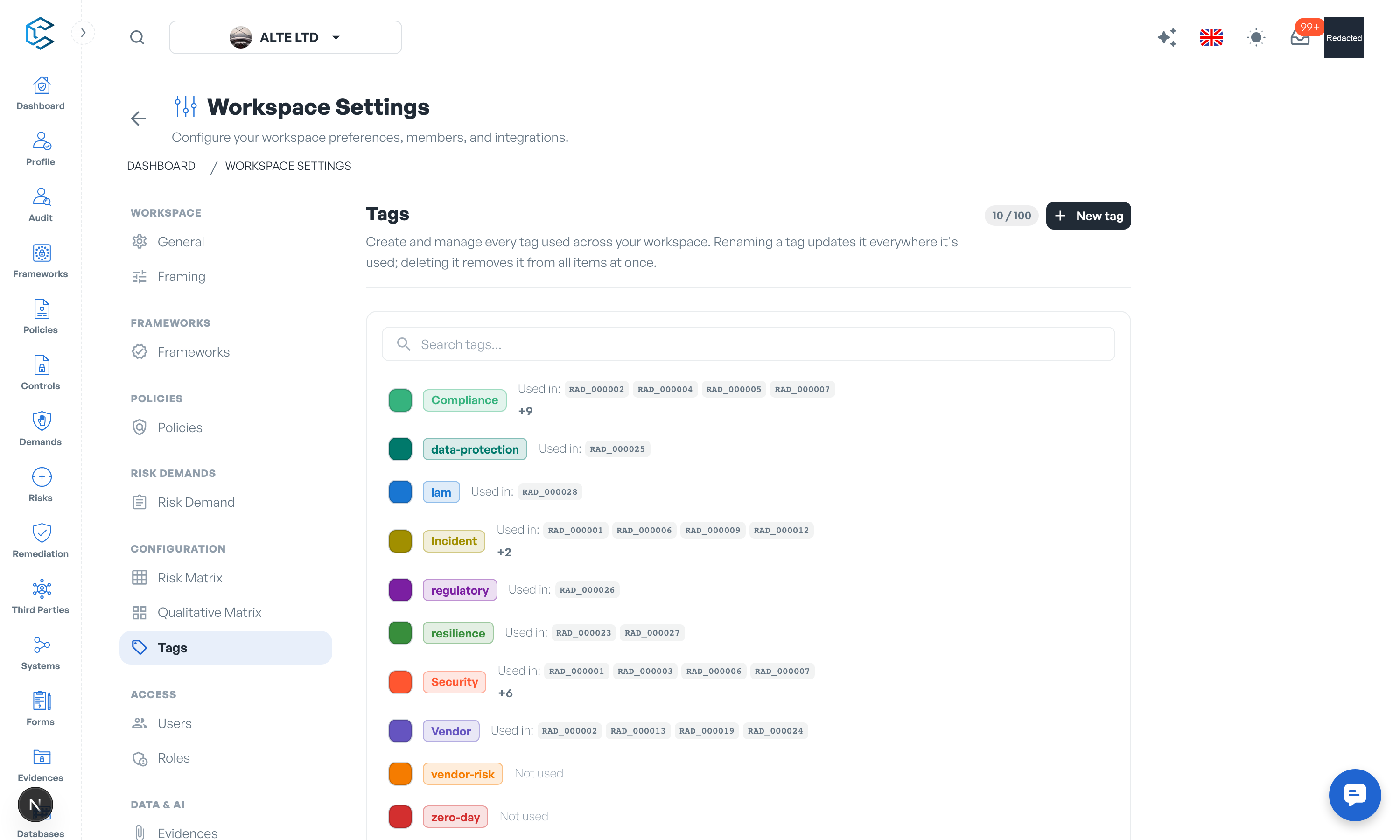
The section lists all workspace tags with a search field and a usage indicator per tag, so you can see which tags actually earn their keep and which items use them. From here you can:
- Create a tag: click New tag, type a name (up to 30 characters, no special characters) and pick a colour from the curated palette. A workspace can hold up to 100 tags.
- Rename a tag: the new name applies everywhere the tag is used, instantly.
- Change a tag's colour: the palette is shared across the app, so the tag looks identical wherever it appears.
- Delete a tag: removes it from all items at once.
2. Where Tags Are Used
Tags are applied to risk demands, either from the demand itself (the tag picker also lets you create a tag on the fly) or by managing them here first. Each tag's row in this section shows how many demands use it and which ones, so cleaning up is safe: you always know what a deletion will touch.
Tip: agree a small, shared tag vocabulary with your team (for example by initiative, by audit cycle or by business unit) rather than letting everyone invent their own. One hundred tags is a ceiling, not a target.
Privacy note. Personal details in this revision have been removed, masked or replaced for privacy. The original is retained privately.