

The Workflows Section
The Workflows Section enables you to manage and enforce structured processes across your workspace, ensuring accountability, clarity, and consistency in cybersecurity governance. Workflows represent the various stages or steps in critical processes throughout the application.
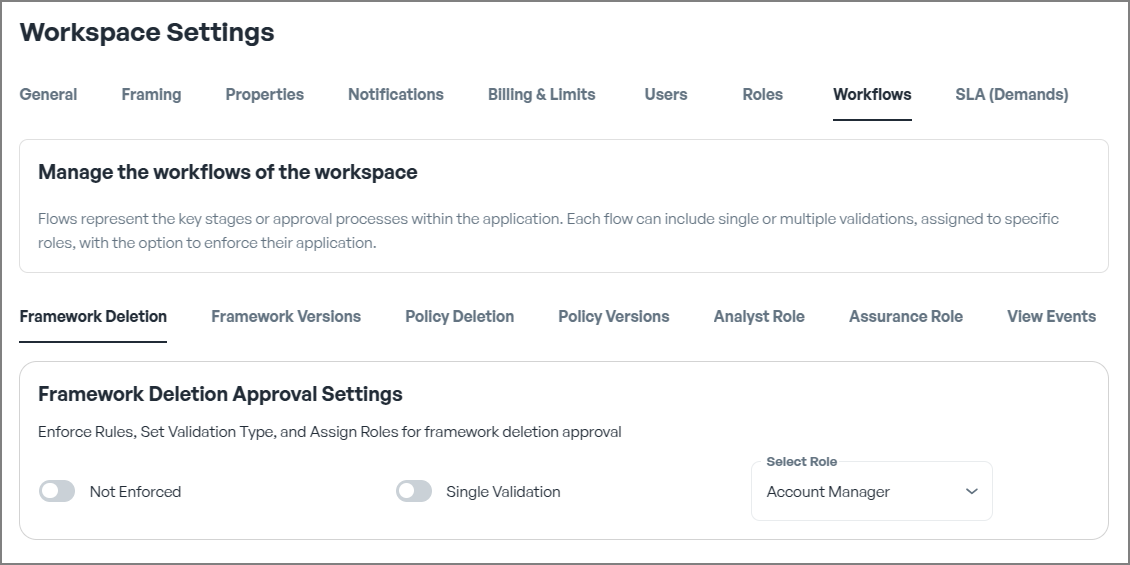
Default Settings
By default, workflows are not enforced, allowing any user to perform actions freely. However, for better control and governance, we strongly recommend the following steps:
- Creating Roles: Define roles that reflect responsibilities within your organisation.
- Enforcing Workflows: Activate workflows to control the sequence of actions and ensure structured processes.
- Assigning Workflows to Roles: Link workflows to specific roles to enhance control, accountability, and clarity.
Benefits of Enforcing Workflows
Enforcing workflows in CSFaaS provides the following advantages:
- Improved Oversight: Maintain visibility into processes, task statuses, and completed actions.
- Compliance Assurance: Ensure alignment with internal and external policies and regulatory standards.
- Structured Processes: Transform free-form tasks into an organised sequence of steps aligned with organisational needs.
- Operational Efficiency: Streamline workflows, reduce manual errors, and minimise inefficiencies.
- Enhanced Security Controls: Require appropriate approvals for critical tasks, ensuring security and accountability.
By activating workflows, you ensure that every action follows a predefined sequence, reducing risks associated with unstructured or arbitrary task execution.
Workflow Enforcement Types
Workflows can be enforced for a variety of key actions within the platform. Below are common enforcement scenarios. These enforcement points ensure that sensitive actions are reviewed and approved before execution, preventing unauthorised changes and enhancing process integrity.
Framework Deletion
Enforce Rules, Set Validation Type, and Assign Roles for framework deletion approval.
Framework Versions
Enforce Rules, Set Validation Type, and Assign Roles for framework version approval.
Policy Deletion
Enforce Rules, Set Validation Type, and Assign Roles for polcies version approval.
Policy Version
Enforce Rules, Set Validation Type, and Assign Roles for framework version approval.
Analyst Role
Define a Simple Review Flow or a Structured Flow with Requesters and Analysts.
Assurance Role
Define Validation Requirements to Ensure Compliance and Assurance review Processes.
View Events
Allow the users associated to this role to view all events.
Single vs Multiple Validation
Validation mechanisms play a crucial role in maintaining workflow integrity. CSFaaS offers two types of validation approaches:
- Single Validation: Suitable for straightforward scenarios where approval from one authorised user is sufficient to ensure compliance and correctness.
- Multiple Validation: Ideal for critical or high-risk scenarios where oversight from multiple stakeholders adds an extra layer of assurance and reduces the risk of errors or misconduct.
You have the flexibility to:
- Use a Standard Role: Assign the validation responsibility to an existing standard role with appropriate privileges.
- Create a Specific Role: Define a custom role specifically for validation, assign it to selected users, and enforce multiple validations exclusively from these designated individuals.
This approach ensures adaptability to varying organisational requirements, balancing efficiency with security while providing clarity on responsibilities.
Select Role
Assign a predefined role to the selected action, specifying which users or groups are permitted to perform it. By assigning roles to actions, you ensure that only authorized users can execute specific tasks, thereby maintaining structured and secure workflows.
Key Takeaways
- Workflows ensure accountability, consistency, and transparency in cybersecurity processes.
- Enforcement types can be tailored to Framework, Policy, and Risk Management activities.
- Validation mechanisms (Single vs Multiple Validation) offer flexibility and control, aligning with your organisation's security posture and risk tolerance.
By leveraging the Workflows Section, your organisation can build a structured, secure, and efficient cybersecurity governance model aligned with industry best practices.