

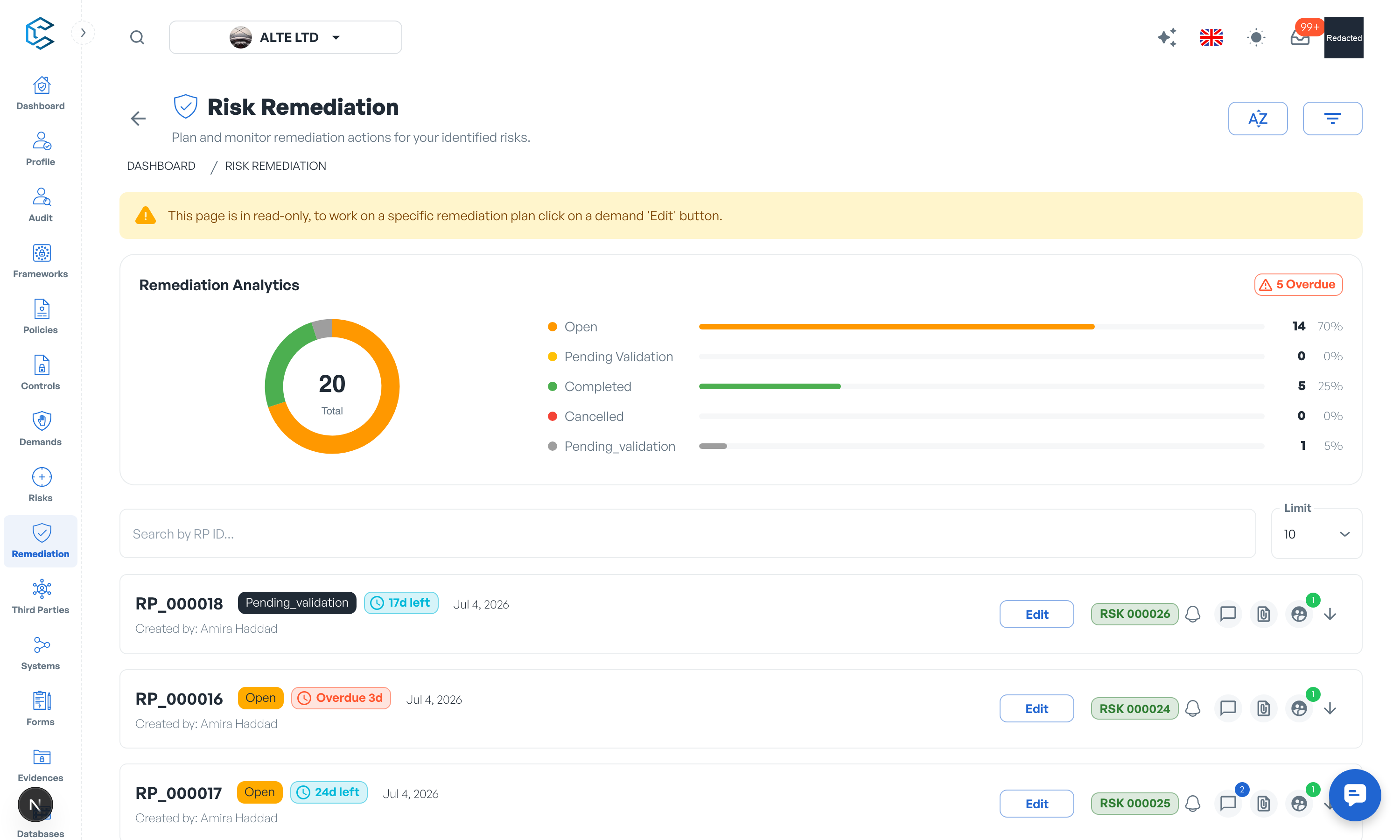
The Remediation module is the central registry of your remediation plans: the concrete actions that reduce the risks recorded in your registry. Each plan carries an RP reference code, a description, the risk it addresses, the people accountable, and a due date, so remediation efforts stay organised and transparent.
1. Tracking each plan
- Linked risk: every plan is attached to a risk; open the risk directly from the plan to see the full assessment behind it.
- Accountability: assign a responsible member and owners to each plan.
- Implementation details: document the approach and the implementation difficulty (low, medium, high).
- Status: plans progress to completion, passing through pending validation where your workflow requires it; a completed plan can be reopened if the fix did not hold.
- Evidences: attach the files or links that prove the work was done.
2. Deadlines and SLA
Remediation plans use the same deadline model as demands: a due date with an SLA countdown pill showing days left, due today, or days overdue. Changing a due date requires a justification, and the history of changes is kept on the plan. A plan counts as overdue only while its due date has passed and it is not yet completed or cancelled.
3. Oversight
The registry's analytics summarise total and overdue plans, and filters (including an overdue-only view) keep the backlog manageable. Remediation activity also feeds the Dashboard cockpit, so management sees plans in flight at a glance.
The remediation chapter of this documentation details the lifecycle, the SLA model and the link with the risk registry.
Privacy note. Personal details in this revision have been removed, masked or replaced for privacy. The original is retained privately.