

Open Forms in the workspace navigation to find reusable questionnaires. Library lists their status, questions, sends, answer rate and owners. Search by name or description, use Filter to narrow the list, and select a form to open its record.
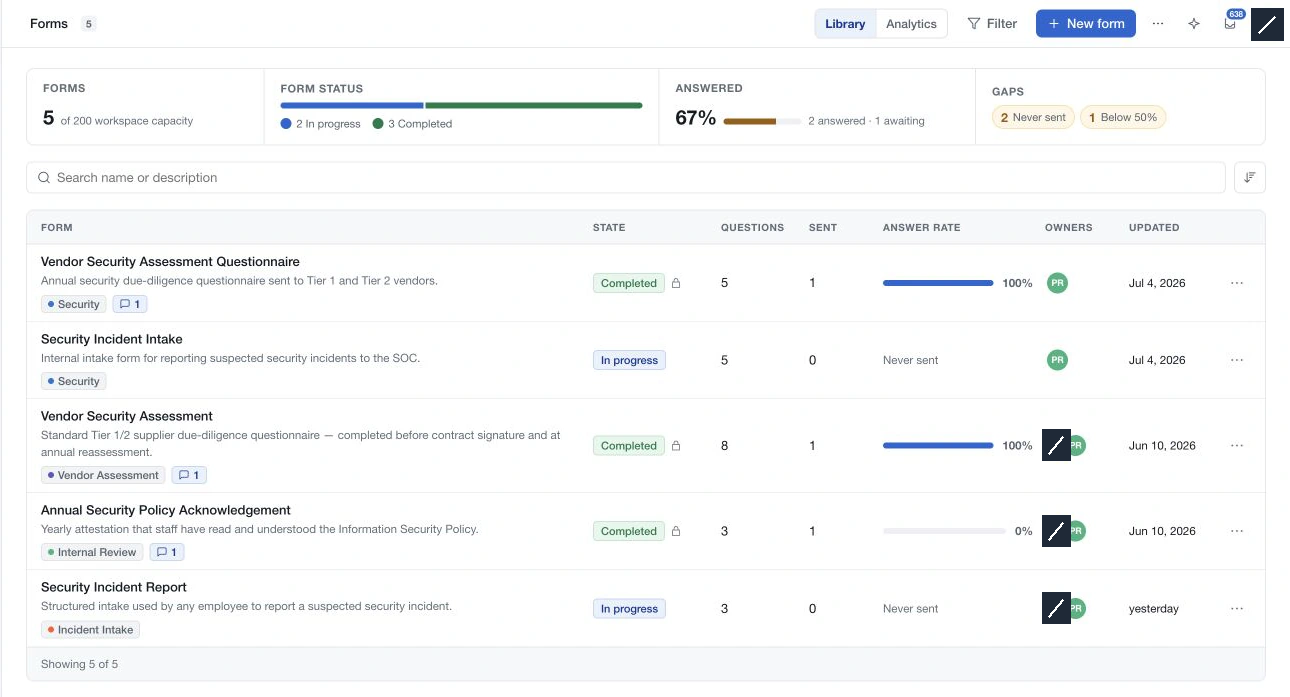
Each form has three tabs:
| Tab | Use it to |
|---|---|
| Design | Build and preview questions; see the definition used by recipients. |
| Responses | Review delivery counts and open the recipient history. |
| Details | Read the purpose, categories, creation details and owners. |
Choose New form to start from a name and purpose, or browse a template first. Save and review the questions before marking the form completed. Completed forms are read only, and sending locks their question definition so it continues to match the answers.
Send a completed questionnaire from the Forms action on the relevant system, third party or risk demand. The central library is where you prepare questionnaires; the source record gives each delivery its context.
Use Analytics to follow submissions across the workspace. Check the period before interpreting an empty chart: the initial view covers the last 30 days, while All time includes older deliveries.