

Use Frameworks to organise the requirements that guide your programme and assess how your organisation addresses them. You can import an available reference or start a custom structure.
Start from the register
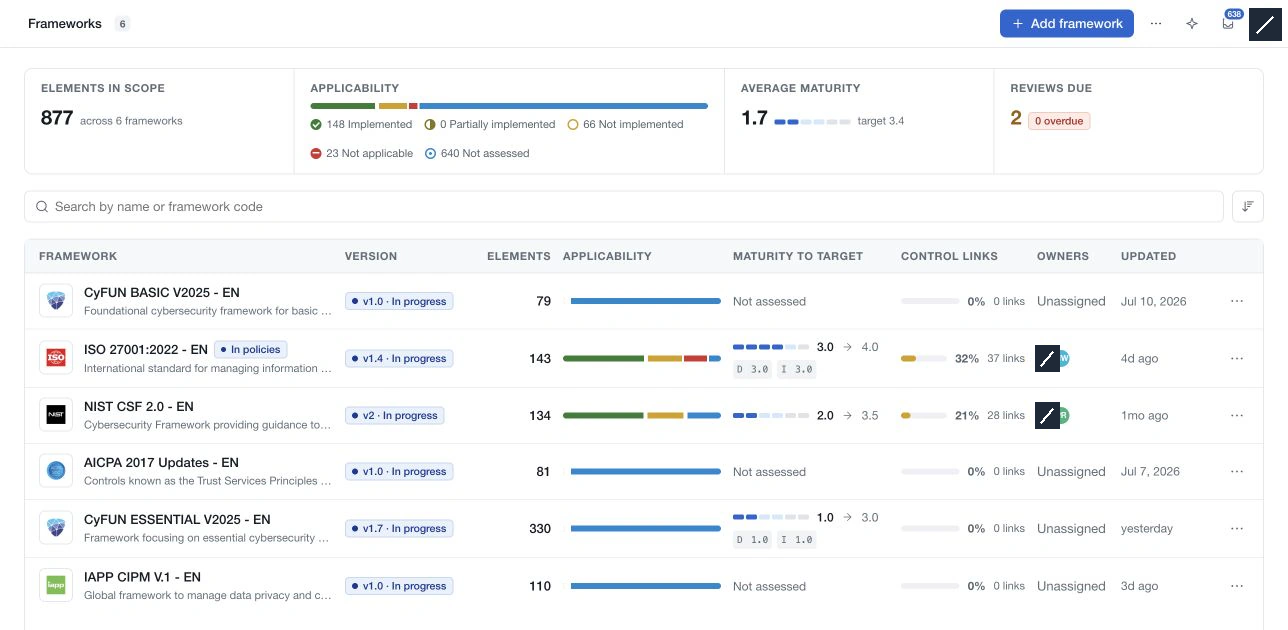
The register shows the selected versions, structure sizes, applicability, maturity, policy-control links, owners and update information. Search by name or code, sort the list and select a framework to open it.
Inside a framework, Structure combines the requirement tree, the selected requirement and its record panel. Statistics provides maturity and applicability views. The version button opens history and the actions available for the selected version.
Assess requirements
Record applicability, maturity, weighting and justification at the relevant levels. Current applicability includes Partially implemented and Not assessed. Where dual maturity is enabled, assess documentation and implementation separately.
Save requirement edits using the editor's Save or the page's Save changes control. Closing an editor can leave a pending draft; use Discard to remove unsaved changes. Relationship, workflow and resource actions have their own controls.
Use policies to describe the controls that address requirements and evidence to support the assessment. A complete link set, a high maturity score and approval of a framework version are different decisions.
Supported CyFun 2025 frameworks also offer CyFun actions for their assessment summary and official workbook exchange.