

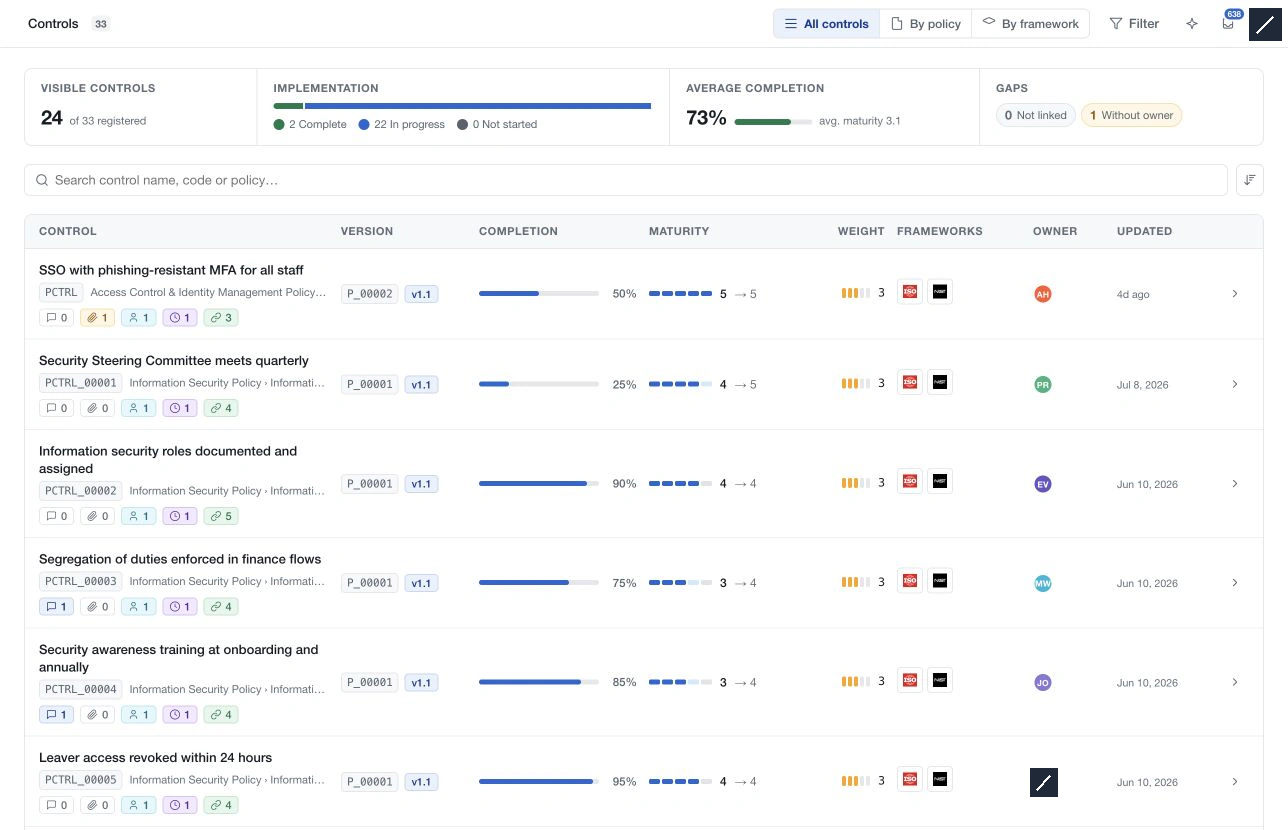
Open Controls under Compliance to review implementation across policies. The register combines each control's identity, policy location, version, completion, maturity, weight, framework relationships, owner and last update.
Choose the scope
All controls shows controls from current editable policy versions. Use By policy to choose a policy and version, including an approved version. Use By framework to inspect controls linked to the selected framework version.
The visible result count describes the selected scope and filters. It can be smaller than the registered total even when no filters are selected. Approved or historical versions display an immutable-version notice.
Open a control
Select a row to read its definition, assessment and supporting resources. Review completion and maturity separately: one describes implementation progress; the other describes the assessed capability level.
Create and organise controls in Policies. For structured classification, open the control there and use Attributes. Use the standalone register to compare records and follow gaps such as controls without owners or framework links.